Every language a task can be set in
A task is set in a language, and the language decides what the editor looks like and how the work is run. There are twenty-one of them, and none needs anything installed.
The ones that are a program
Python, Java, Go, C, C++, C#, Haskell, OCaml, R, Ruby, PHP, Rust, Kotlin, Prolog, Node with JavaScript, Node with TypeScript, and Bash. Each gets an editor, a Run button and a place for the output, and each really compiles or interprets: a Java task that will not compile shows you the compiler saying so.
Every one of them can carry hidden tests, which a Tests tab holds, and a data file the program reads. The framework is the language’s own: pytest for Python, JUnit 5 for Java, go test for Go and Node’s test runner for both Node languages. A Bash test is a script that passes when it ends without an error. A C or C++ test is a function named test_ something that passes when it returns and fails when it crashes or an assert fails, and a C# test is a public static method named Test something that passes unless it throws. A Haskell test is a top-level definition named test_ something whose type is IO () or Bool, passing when the action returns or the value is True. An OCaml test is a function of unit named test_ something, passing when it returns, and an R test is a function of no arguments named test_ something, passing when it returns, so stopifnot() is how it fails. A Ruby test is a top-level method named test_ something and a PHP test a function named test_ something, both with no parameters and passing when they return; a Kotlin test is a top-level function named test_ something. A Rust test is any function marked #[test], run by Rust’s own test harness, and a Prolog test is a predicate named test_ something with no arguments, passing when its goal succeeds. Every one fails by raising an error or throwing.
A web app in Python, Node, Go, Java and static HTML, CSS and JavaScript sites can also be deployed from a public GitHub repository to an address of its own, which has a page of its own in this manual.
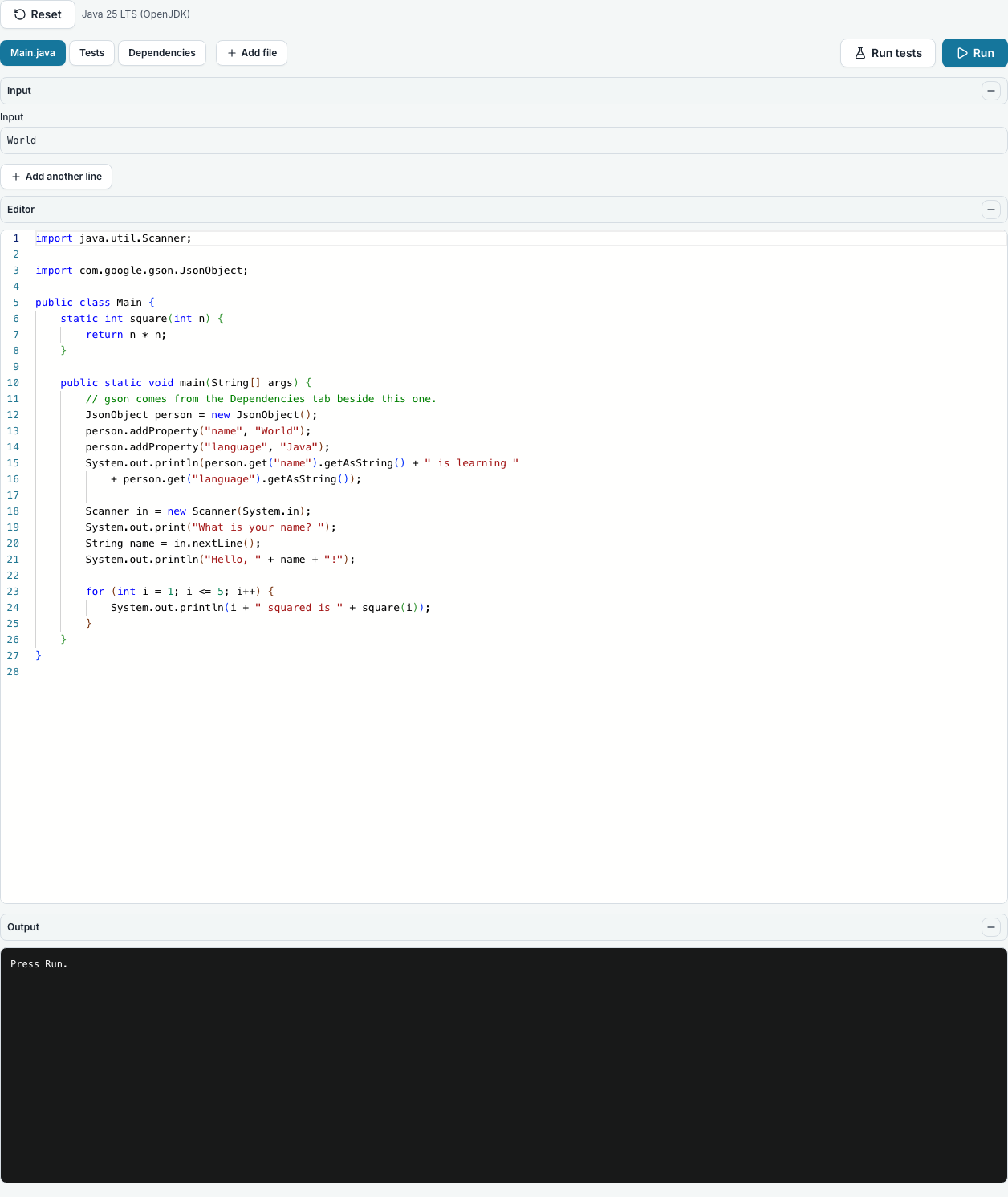
What differs between the program languages
Packages come from the project’s own package file, at the top of the file tree and marked Packages: requirements.txt or pyproject.toml for Python, pom.xml for Java, go.mod for Go and package.json for Node and TypeScript on Node, with the versions named exactly. They are fetched in a separate container and handed to the run read-only, and the run itself has no network. A new task opens with a small worked example to replace. Students always see the file and can change it only if the task allows. Bash, SQL, C, C++, C#, Haskell, OCaml, R, Ruby, PHP, Rust, Kotlin and Prolog have no package file, there being no network for a package manager to reach.
To use a package file you already have, upload it at the top of the tree, or make a file of that name there: it becomes the task’s package list rather than an ordinary file. A task has one, so to switch a Python task from requirements.txt to pyproject.toml, rename the file. A Java pom.xml is read for its properties, dependency management, parent and BOM imports and scopes, a test-scoped package being there for the tests only, and only Maven Central can be reached. A Java task made before pom.xml keeps its older dependencies.xml, which still works; paste a pom into it or rename it to pom.xml to change. The package files have a page of their own in this manual, with what each one may name and how the packages are installed.
The editors are not equally clever, and it is better to know before choosing. Python has red-squiggle error checking, completion, hover help and function signatures, all worked out by reading the code and never running it. JavaScript and TypeScript on Node underline syntax errors as you type, while a TypeScript type error appears when you press Run, because the compiler decides that. Java, Go, C, C++, C#, OCaml, R, Ruby, PHP, Rust, Kotlin and Bash have syntax colouring and nothing smarter, and Haskell and Prolog are shown as plain text, the editor having no mode for either.
A few details teachers ask about. In Java the public class is always Main, and the starter shows it. Every Go file is package main. Bash is real bash, so arrays and [[ ]] work. Standard input is a box under the code, and because read -p shows nothing without a terminal, the Bash starter prints its own prompt first. C and C++ are compiled as C17 and C++20 with warnings on, and a warning is shown but never stops the program running. A C# program can be written with a Main method or with top-level statements. The tests are joined onto the end of the program, and the program is loaded to run them, so the starters read their input with an end-of-file fallback. OCaml has no main guard, so a top-level let () = runs when the tests do. An R program guards its main with if (sys.nframe() == 0) main(), as the starter does, which is false when the tests load the file. In R, readline() does not read standard input in a script: use readLines(file("stdin")). A Haskell test file may carry its own imports. Ruby and PHP programs guard main with if __FILE__ == $0 and a realpath comparison, as their starters do, and a Prolog one with :- initialization(main, main), so none runs during the tests. A Rust test hung in a loop is stopped only by the whole run’s time limit. C#, Haskell, OCaml, R, Ruby, PHP, Rust, Kotlin and Prolog run on one dedicated machine rather than on every one, so if that machine is down a run says so instead of starting, and trying again a little later works.
A program that writes files, a report or a chart, gets them offered under the output as soon as the run finishes, up to five files in all. Text files can be up to 64 KB, and a PNG, JPEG or WebP picture up to 1 MB is shown under the output as well, so a chart drawn by matplotlib simply appears. What the program wrote is judged by its contents and not its name, SVG is never shown as a picture, and anything left out is listed with the reason. The links last half an hour and always download, never opening in the tab.
The ones that are more than a file
A web page is HTML, CSS and JavaScript in three panes with a live preview. A SQL task is a query and the database it runs against, in two tabs. For a real shell, set a container lab or a VM lab.
Each of those has a page of its own in this manual, because what a teacher sets and what a student does are different in each.
The ones that are not code at all
A written assignment, a quiz, and two kinds of diagram. Those are all set the same way as a program and marked differently.
Questions people ask
- Can I mix languages on one module?
- Yes. A module holds whatever tasks you put on it, in any language.
- Which Python version?
- Python 3.13, shown on the editor itself so nobody has to ask.
- Can students install packages?
- On any task with a package file, which is every program language except Bash, C, C++, C#, Haskell, OCaml, R, Ruby, PHP, Rust, Kotlin and Prolog, so long as you have allowed it. Students can always see the list; the task decides whether they can change it.