Set an HTML, CSS and JavaScript task
A web task is three files rather than one: the page, the styles and the script. The student edits any of them and the preview beside the editor redraws.
Three panes and a preview
The tabs are the files. The preview is the page as it stands, rendered in an isolated frame, so a broken script breaks the preview and nothing else.
There is no server to start and no file to save to a desktop. That removes the usual first lesson of a web unit, which is teaching thirty people where their file went.
The page is made and run in the student’s own browser, so a web task has no Run button, no queue and no run time to set: the preview is the running of it, and it follows the typing. A whole HTML document pasted into the HTML pane is used as it stands, with the styles and the script put inside it, rather than being wrapped in a second page.
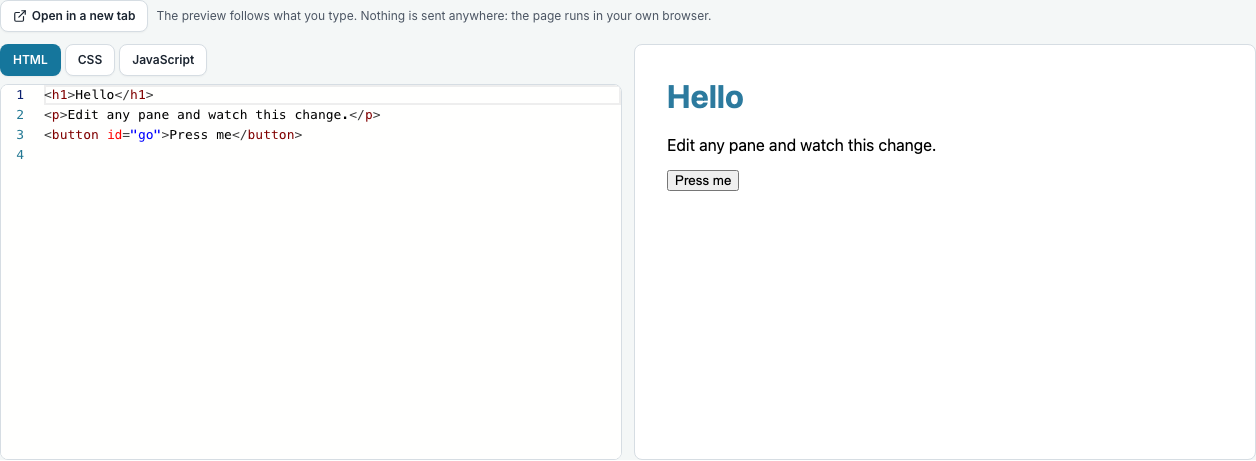
What you set, and what they hand in
You write the starting three files, and whatever you leave in them is what each student begins with: a page with no styles, a stylesheet with a comment where the rule goes, or all three empty.
A web task cannot be given a fourth file, because the three panes are what it is. That is deliberate: a task whose shape can drift is a task the marker has to guess about.
There is a TypeScript variant, Web (TS), with the same three panes where the script is TypeScript. It is compiled in the tab as it is typed, and a type error never blocks the preview, because there is no Run to refuse.
In a lesson
A Web or Web (TS) code block in a lesson has the same three tabs and the same preview, so a class can change a page without leaving the lesson. What you write in the block is what every student starts from, and each student’s changes are saved to their own copy: yours is never moved by them.
Tick “Let students change this page and see it” on the block, which is on when the block is made. Leave it off and the page is shown as code to read, as it was before. There is no Run button and no input box, because a page has neither: the preview is the running of it.
Questions people ask
- Can they use a framework?
- It is plain HTML, CSS and JavaScript, which is what the specifications ask for. A TypeScript variant is there for a class that has moved on.
- Does the preview run their JavaScript?
- Yes, in an isolated frame that cannot read the site’s cookies or stored data, so an infinite loop costs them the preview and nothing else.