A real Linux terminal in the browser
Teaching the command line usually means a virtual machine per student or an SSH account each, and both are somebody else’s decision. The Linux Terminal in the playground is a real machine that boots in the browser tab, for anybody to practise on. To set a class a terminal as work, make a lab.
What it is
A small Linux system running in the page itself. Commands do what commands do: a student can make files, break their own permissions, and start again by reloading.
Nothing they do reaches anybody else, because the machine is theirs and lasts as long as the tab.
It runs entirely inside the student’s browser, so nothing they type is sent anywhere. It starts in a few seconds on a fast connection. On a slow one, or with Data Saver switched on, it starts from cold instead of downloading a 75 MB saved snapshot, which takes much longer, so try it on your own network before a lesson.
Nothing is kept: reloading the page starts a fresh machine, and the files from last time are gone.
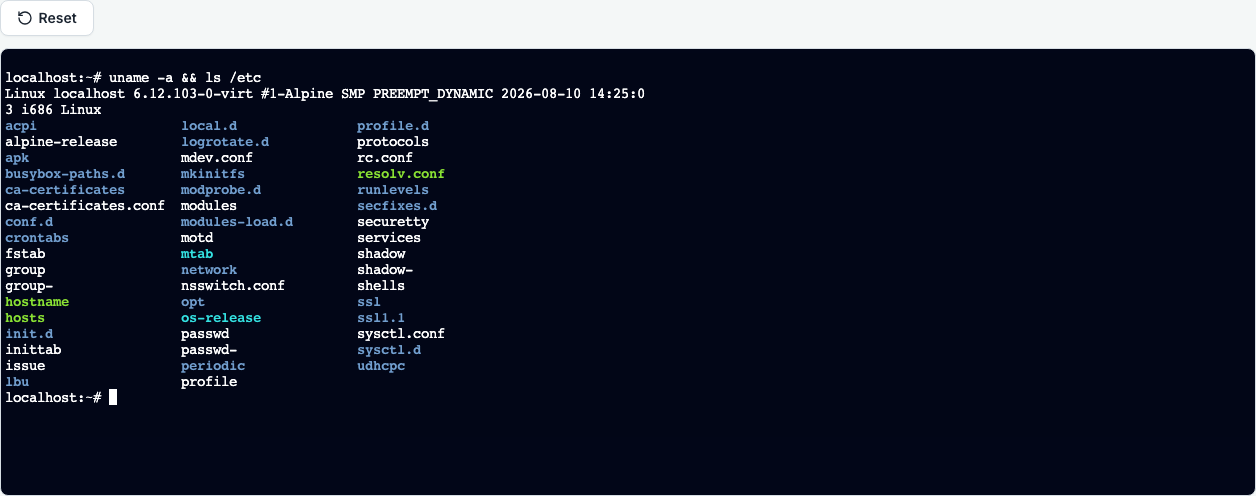
Setting a terminal as work
The Linux Terminal is the playground’s and is not a kind of task. To give a class a terminal as work, make a lab on the module: a container lab gives each student their own set of services with a terminal beside them, and a VM lab gives each an Ubuntu machine with sudo. You choose which, and the lab is handed out, saved and marked like any other task.
Questions people ask
- Is it a simulation?
- No, it is a real Linux system. That is why a command that would fail on a real machine fails here.
- Can a student break it?
- Theirs, yes, and that is often the lesson. Reloading gives them a fresh one.
- Can a student keep their work, or use sudo and install things?
- Not in this terminal, which starts fresh each time. For that, set an Ubuntu VM lab instead, or point students at the VM page: it is a real Ubuntu machine with sudo and a disk that is saved between sessions.