Deploying a web app from GitHub: Python, Node, Go, Java or a static site
Writing a program is one thing; getting it running somewhere other people can open is another, and it is the part a classroom normally cannot reach at all. A student can deploy from a public GitHub repository here, with no cloud account and no card, and a teacher can ask for a deployed app as what an assignment hands in.
It deploys Python, Node, Go, Java and static HTML, CSS and JavaScript sites. It is for learning and demonstrating, not production hosting: long enough to show a teacher, share with a few people or hand in a link, and deliberately not long enough to run a service on.
Start from a sample
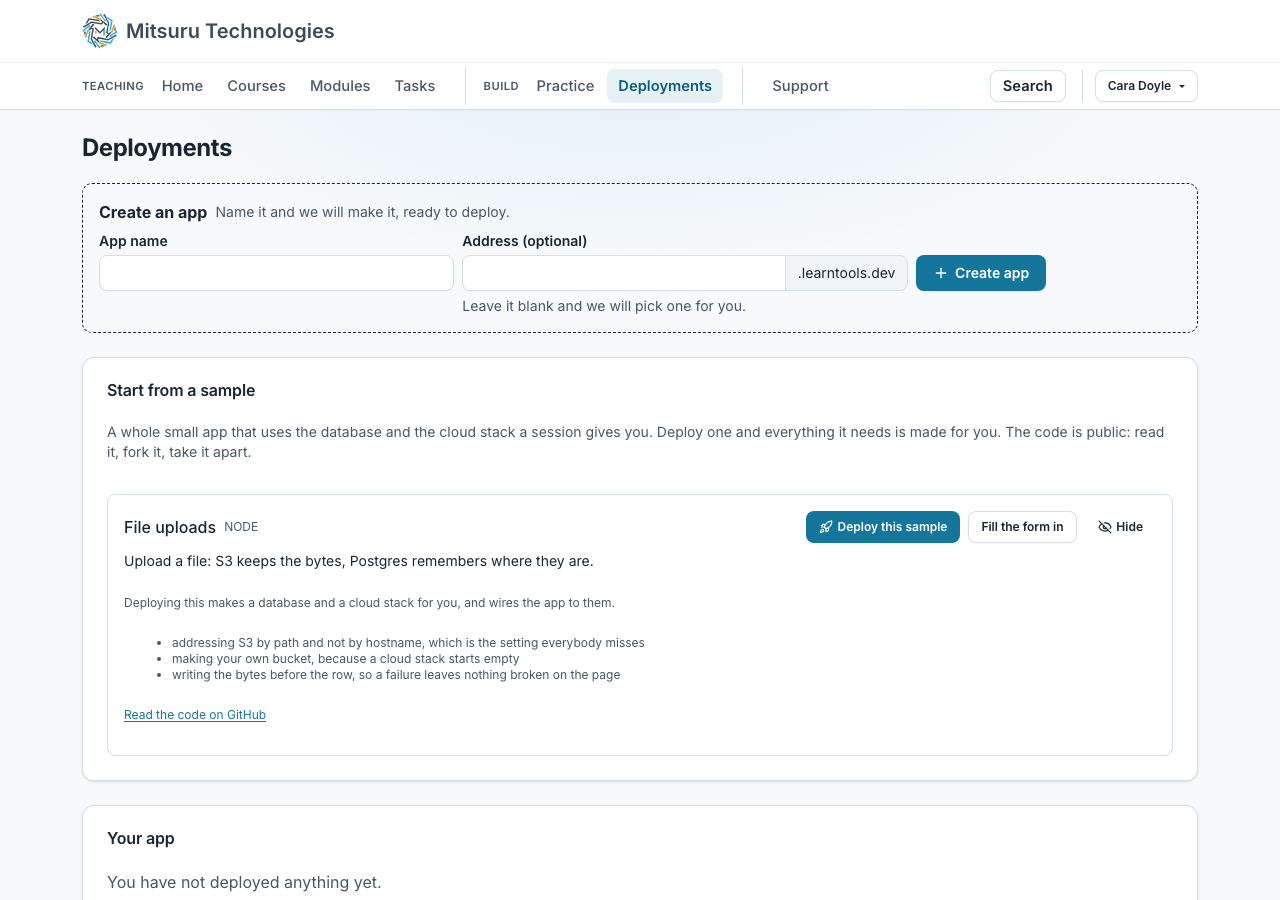
On the Deployments page there is a sample app: File uploads, in Node, Python, Go and Java, the same app in each so you can compare the languages. You upload a file, it goes into S3, and where it went is remembered in Postgres. Press “Deploy this sample” and everything it needs is made for you — a database and a cloud stack — and the app goes up already wired to both. There is nothing to set up first and no connection string to copy. “Fill the form in” is there for the other case, changing the repository or the branch before it goes up.
It is there before anybody signs in, so somebody deciding whether this is worth an email address can see a real app running first. Nothing is made for anybody until they press the button, so it costs nobody any of their app time. A student who already has a database or a cloud stack gets that one rather than a second.
The code is public and worth reading — it is short, and the README explains the three things students get wrong first: addressing S3 by path rather than by hostname, making your own bucket because the cloud stack starts empty, and writing the file to S3 before the row to the database, so that a failure never leaves a file on the page that cannot be opened.
If you would rather not see it, press Hide on the row and it will not be offered to you again.
Trying it without an account
Nobody needs an account to see it work. Pressing Deploy, or Create on the Database or Cloud tab, makes a temporary account in that browser and signs it in. A guest has limits of its own, which a sysadmin can change: its account is kept for 24 hours after it was last used, each deployment runs for at most 30 minutes, and it may make 2 deployments in all and 1 database, with one cloud stack beside it that does not count against the database.
A guest cannot invite anybody to see an app, because an invitation is a link a named person sends, and cannot deploy a private repository, because a token stored against an account nobody can return to could never be withdrawn. Keep this account takes an email address and a code and makes the same account theirs, with everything it deployed in it. A guest nobody comes back to is deleted with its apps, databases, files and saved container labs.
What they give it
A GitHub repository and a branch, the language, a build command and a start command. The box already holds something that deploys: the student’s own last repository or, for somebody who has never deployed, one of ours for the language chosen (hello-flask, hello-node, hello-go, hello-spring or hello-static), so the first attempt is a working one and the second is theirs. Changing the language swaps one example for another and never overwrites what they typed.
A private repository works too. Tick This repository is private under the repository box and paste a GitHub token: a fine-grained personal access token, limited to that one repository, read-only, with an expiry date. It is stored encrypted, it is never shown again to anybody, and it is used only to fetch the code. It never reaches the running app, so nothing the student deploys can read it, and whoever marks the work uses it to build the app without ever seeing it. Untick the box to take it back.
Settings the app reads from its environment go on the same form, as rows of a name and a value, up to 20 of them and up to 4 KB each. PORT and the runtime’s own names are refused. They are stored encrypted and shown to nobody once saved: the page shows bullets, with Replace and Remove. A hand-in points at the saved deployment, so whoever marks it deploys the app with the student’s variables and sees only their names. A DATABASE_URL typed beside a database chosen on the form is refused, with a sentence saying which to remove.
The app has to listen on the port it is given, which is the one real lesson in the exercise and the one every hosting platform teaches the hard way.
Two ticks on the same form give it more to work with: a database of their own, and a cloud stack with an object store, a NoSQL table and a message queue in it. Both start with the app and set their own variables, so an assignment can ask for an app that stores what people upload rather than one that only draws a page.
Which languages
Python, Node, Go, Java and static HTML, CSS and JavaScript sites, and no others: each is built and run in a container for that language, with that language’s package registry reachable and nothing else. Python runs under gunicorn, so Flask and Django both work; Node is whatever its start script runs; Go and Java are built from source, Java as a Spring Boot application; a static site is served exactly as it is in the repository.
Each language has a working example repository of ours already in the form, so a student who has never deployed anything has somewhere to start.
A static site is the narrowest of them: it installs nothing, so its build reaches GitHub and no other host. Its build command checks that there is an index.html at the top of the repository, because pages kept in docs/ or dist/ would otherwise deploy and then answer a directory listing. To serve a subfolder, add --directory and its name to the start command rather than moving the pages.
Where it runs, and who can see it
Every app gets an address of its own under learntools.dev: two words and a number, or a name the student chooses and keeps, so a link they put on a CV still works the next time they deploy. A chosen address stays theirs until they delete it, and nobody else can take one that is held.
Nobody reaches an app by guessing the address. The student invites up to 5 people by email; each follows a link and confirms a code sent to that same address, so an invitation cannot be forwarded. The student’s own way in is on their page.
Staff can stop one. A sysadmin can stop any app, database or cloud stack; anybody on the staff of a college can stop one belonging to a student of that college, not only the college admin, because the person a report reaches is whoever is teaching. Before this the only things that ever stopped an app were its own time limits, which is no answer at all when something has to come down now.
Stopping is only stopping. The saved data stays, the address stays, and the student can start it again; taking somebody else’s work away is a different thing and nobody can do it. Every stop by somebody other than the owner is written down, on the Deployments pages where the student reads the same entry the staff do, and in the college’s own admin log.
How long it runs
An app is guaranteed an hour and keeps running while there is room, up to 4 hours, stops after 30 minutes with nobody looking at it, and each account has 8 hours of app time a day.
It is for learning and demonstrating, not production hosting: long enough to show a teacher, share with a few people or hand in a link, and deliberately not long enough to run a service on.
The page says what is left of the day before anything is deployed, shows the last lines the app printed while it runs, and keeps its log for three days after it stops, which is when somebody most wants to read it.
Past its guaranteed time an app goes on running for as long as nobody else needs the room, and is the first to be stopped when somebody does: a deployment arriving at a full machine stops the app that has run longest, and only one that is already past its guarantee. A fifth figure counts builds rather than minutes, 20 deployments a day by default, because a build costs the same however long the app then lives and a student redeploying on every commit is what puts a class in a queue. A sysadmin sets all of these for the whole platform and per college.
There is one app at a time. Until the current one has stopped the Deploy button is off, and the page says whether it is queued, with how many are ahead of it, being built, up or stopping. An app that stops on its own is reported with its own last output, apart from one that would not build, so nobody is sent through a build log for a fault in their program. The last ten lines it printed refresh about once a minute, the whole log can be downloaded, and earlier deployments are a table of when, in what language, from what repository, how it ended and its log.
A database beside the app
A Database tab beside App under Deployments lets a student make up to three databases of their own, each up to 10 MB: PostgreSQL or MySQL as a server, or SQLite as a file. Picking one in the deploy form starts the server with the app and sets DATABASE_URL to it, so the code they wrote against SQLite on a laptop reads the same variable here; a SQLite file is put into the app and saved back when the app stops.
Nobody is asked what to call it. A database takes the name of the address the student’s app answers on, with a word for which of the two it is: an app on sams-shop.learntools.dev gets a database called sams_shop_db and a cloud stack called sams-shop-cloud. A database’s name is a SQL name, so the hyphens in an address become underscores, which is what every engine and every driver takes as it stands. A cloud stack keeps its hyphens, because its name becomes the name of a storage bucket and those cannot contain an underscore. A second database off one address counts up, sams_shop_db_2; an address that starts with a digit takes the word first, db_2048_game; and somebody who has deployed nothing yet gets db_1 or cloud-1. The form says what it is about to make before the button is pressed.
A server runs for exactly as long as an app does and its data is saved when it stops and put back when it starts. Only an app deployed here can reach it; the page shows the connection details so a student can read what the variable means. Whoever marks a handed-in app gets the student’s database with it, with the student’s data, and cannot change what is saved.
Each database has Start, Stop, Download and Delete. A server can be started on its own, and the saved data downloads as a .sql dump, or as the .sqlite file for SQLite, which the app finds in /data, named after the database (/data/sams_shop_db.sqlite, say), with its path in DATABASE_PATH. A running server has a Query button that opens the same Query and Schema tabs as the SQL playground, against the real database and as the student’s own role; the Schema tab is read-only there. Delete is refused while the database runs or while a handed-in deployment names it, and a deployment that has not been handed in simply loses it and deploys without one. At the 10 MB limit a server goes read-only and the page says the last changes were not saved. The credentials are generated, never chosen, and the password is sealed: the page shows the URL, host, database and user, and the password when asked for it.
One session: the app, a database, a cloud stack and a terminal
Deployments is one item on the bar, with tabs for App, Database and Cloud, and each tab draws the same picture of the student’s session at the top: one private network holding the app, one database, one cloud stack and a terminal, each slot saying what is in it. Everything running reaches the others by fixed names, app, db and cloud, so the configuration in a tutorial works unchanged and nothing needs a URL.
Open terminal on any of the tabs starts a shell beside the session, with psql, mariadb, aws and curl already pointed at its database, cloud stack and app. There is one terminal per session and it is counted as database time. Its home folder goes with the session, so what lasts is what the student put in the database or the bucket.
As coursework: handing a deployed app in
A written assignment can ask for a deployed app instead of a file. The brief is yours as usual; what changes is the hand-in.
- Set the assignment. Under What to hand in, choose A deployed app, and then which language students should deploy in.
- The student deploys. Their task page shows Deploy your app, which opens the deploy page with that language already chosen. They deploy, check it works, and press Hand it in.
- What is handed in. The whole deployment: its name, and every app under it with the repository, the branch and the two commands that app ran with. A student with a front end and an API hands in one piece of work, not two. It is kept against the task like any other hand-in: marked, sent back and versioned the same way.
- Mark it by running it. Open their work and press Deploy app. The same app comes up again on an address of its own, and standing up a whole class’s submissions does not spend your own daily allowance of app time. Where the deployment holds several apps, each is listed with a link of its own, and they come up one at a time.
Marking a deployment, and limits for a contest
A submission does not have to be a working deployment. A student whose build will not build can still hand in and say so in the conversation; what is refused is a repository or a branch the deploy page itself would refuse, so what is handed in is at least something that could be built.
Whoever marks it gets no daily limit on app time, and only for the work being marked: standing up twenty-five submissions would meet a student’s own allowance within the first few, so the day’s minutes and the one-at-a-time rule give way, and the page says so. The session ceiling does not, so an app left behind still ends, and a teacher deploying an idea of their own is on the ordinary limits like anybody else.
A task can set limits of its own, which is what a contest or an exam is for. Its settings tab takes how many deployments it allows and how long each app then lives. They are counted inside that task’s own clock, so somebody who starts late gets their own window, and they apply to every app that student deploys while the clock runs, not only ones they say are for the task. A task can only shorten what the college allows.
Questions people ask
- What languages can be deployed?
- Python, Node, Go, Java and static HTML, CSS and JavaScript sites. The build and start commands are the student’s to edit within that language, and a repository in anything else will not build.
- Is this a hosting service?
- No. It is for learning and demonstrating, not production hosting: long enough to show a teacher, share with a few people or hand in a link, and deliberately not long enough to run a service on. An app stops on its own, and a student redeploys it whenever they need it again, on the same address if they chose one.
- Can the app have a database?
- Yes. PostgreSQL or MySQL as a server that runs beside the app, or SQLite as a file put into it, up to 10 MB each and three per student, made on the Database tab and picked in the deploy form, which sets DATABASE_URL. A server runs for as long as the app does and keeps its data between runs. It is reachable only by an app deployed here, not from a laptop.
- Can somebody try it without an account?
- Yes. Pressing Deploy makes a temporary guest account in that browser, with limits of its own, and Keep this account turns it into a real one with an email address and a code, keeping everything it deployed.
- Can an app have secrets, such as an API key?
- Yes. The deploy form takes up to 20 name and value rows, stored encrypted and never shown again once saved. They reach the running app as environment variables, and a teacher marking the work sees only their names.
- Does the student need a GitHub account?
- They need a repository to point at, which is itself worth teaching: version control and deployment are the same lesson. It can be public or private; a private one is deployed by pasting a read-only GitHub token, which is stored encrypted and shown to nobody.
- Can students choose the address?
- Yes, on Create an app, which is where they name the piece of work and pick the address it answers on: a name of their own, lowercase letters, digits and hyphens, that nobody else holds and that is not one of the reserved words. The deploy form under it asks for neither, so the decision is made once. It stays theirs until they delete it from the table of saved deployments under the form, which is also what lets somebody else have it.
- Can a student put the same app back up without filling the form in again?
- Yes. Every row in the table of saved deployments under the form has Deploy again, which puts that exact repository, branch, commands and variables back up on the same address in one press. Use is still there for the other case, changing something first. It asks nothing before it goes, because Stop is the way back; the one thing it says beforehand is that a deployment with no address of its own comes back on a new one, so an old link stops working. A deployment handed in for an assignment can be put back up this way and changed no other way, which is exactly what read-only means here.
- Can a college turn it off?
- Not off, but down. A sysadmin sets five figures for the whole platform and per college: how long an app is guaranteed, the most it may run, how long with nobody looking, the day’s total and how many deployments a day, each down to a few minutes or a single deployment.
- What happens when it stops?
- The app goes and its log stays for three days. A chosen address is kept, so deploying again puts the app back on the same link; a random one is not.
- Can a teacher take a student’s app down?
- Yes. Any member of staff at that college can stop a student of theirs, and a sysadmin can stop anybody’s, so a complaint about something a student put online has somebody who can act on it the same day. It stops the app rather than deleting anything: the data and the address stay and the student can start it again. The student sees who stopped it and when, on the same page they deploy from.