Give one task a link anybody can open
Any task you teach can be given an address of its own. Send that address to whoever you like and they can open the task and have a go at it, with or without an account.
This is not the same as sharing a lesson with our Library. Nothing is reviewed, nothing is listed, nothing appears on our site and no copy is taken. It is one link to your task, and only the people you send it to have it.
Making one
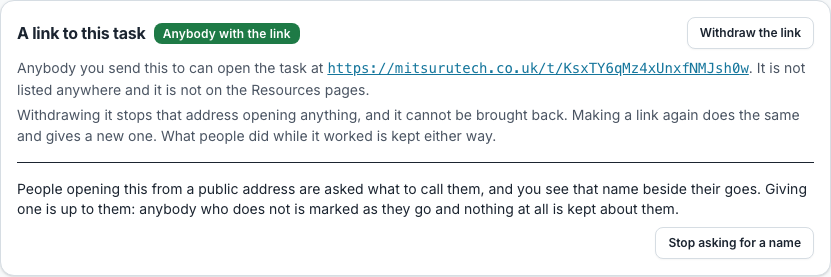
Open the task, go to its Status tab, and press “Make a link” on the panel called “A link to this task”. The address appears on the panel for you to copy.
Anybody who teaches the module can make one, in any college. You do not need to be a site administrator, and the task does not have to be anywhere near our public pages.
Taking it back
Press “Withdraw the link” and the address stops opening anything, straight away. What people did while it worked is kept.
If a link has reached people you did not mean to send it to, press “Make a link” again: that gives a new address and stops the old one working. There is no way to bring a withdrawn address back, which is the point of it.
Names, not accounts
Somebody who opens your link is asked what to call themselves. If they give a name, their goes are kept under it and you see them. Nobody is asked for an email address and no account is made for anybody: a name is the whole of what it takes.
Giving one is up to them, even though the task asks. There is a "have a go without one" link beside the box, and anybody who takes it is marked as they go and nothing at all is kept about them — no name, no goes, no row of any kind. They are not on your table, because there is nothing to put on it.
They can change the name later, and they can delete it: there is a button on the page that removes their name and every go under it. That is theirs and not yours, in the same way the name is.
A name is about one task. The same person on another of your tasks is asked again, chooses again, and the two are nothing to do with each other. Two people may pick the same name, so read it as a label and not as who somebody is.
If you would rather not ask at all, press "Stop asking for a name" on the same panel. Nobody is prompted, and nothing is then kept about anybody who has no account here.
Seeing what people did
On the task’s Status tab there is a table called "Worked it from a link": every name that worked it from the link, when they were last there, how many goes they had and their best score.
Each go is a link. It opens the task exactly as they saw it, with their answers filled in and marked, in a new tab so your list stays where it was. You are reading it, not sitting it: there is nothing to submit and you cannot change what they put.
It is separate from your class register on purpose, because strangers and your class are different groups of people and adding them together would leave you counting strangers among the students who have not handed in.
What somebody who follows it gets
The task, working. A quiz they can sit and be marked on, an exercise they can read and take away. They can have a go without an account at all; giving a name is what keeps the score.
Goes are unlimited and the answers are shown afterwards, whatever the task is set to for your own class. Somebody following a link is revising rather than being assessed. A time limit you set is kept for somebody who is signed in. Somebody who has given only a name has no clock at all, because a clock belongs to an account, so a link is not the way to set a timed assessment.
Following a link does not put anybody on your module. They are not added to your class, they are not counted as one of your students, and they do not appear on your register. Somebody who followed it appears on the task’s own page under “Worked it from a link”, with their name, how many goes they had and their best score.
Where it can be found
Nowhere, unless somebody passes it on. The page asks search engines not to index it and the address is not listed anywhere on the site, so the only way to it is the address itself.
It is still a link and not a password. Treat it the way you would treat a link to a shared document: anybody who has it can open it, including somebody it was forwarded to. If that matters, set the work on a module instead.
Questions people ask
- Is this the same as sharing a lesson with the Library?
- No. That offers a copy for us to read and file in our Library. This publishes nothing and lists nothing: it is one address for your own task, and only whoever you send it to has it.
- Do people who follow the link join my module?
- No. Somebody signed in is put on the task alone, and somebody with no account is not put on anything: their goes hang off the name they gave and nothing else about your module changes.
- Do people need an account to have their score kept?
- No. A name is enough, and no account is made for it. Anybody who would rather not give a name can still have a go and be marked, and nothing at all is kept about them.
- Can I stop it?
- Yes, at any time, and the address stops working straight away. Making a link again gives a different address.
- Will people find it by searching?
- It is asked not to be indexed and is listed nowhere, so the only way to it is the address. Anybody the address is forwarded to can open it.