Sharing a lesson with the Library
A lesson, task or file you wrote can be offered to us for review. A copy goes to our Library, where it can later be offered to other colleges.
It is never published on our Resources pages. Everything on those pages is written and checked by us, so a lesson you share never appears there.
Offering is not publishing
You offer it; we read it and decide. That is deliberate rather than bureaucratic: something other colleges are given is something somebody has looked at first.
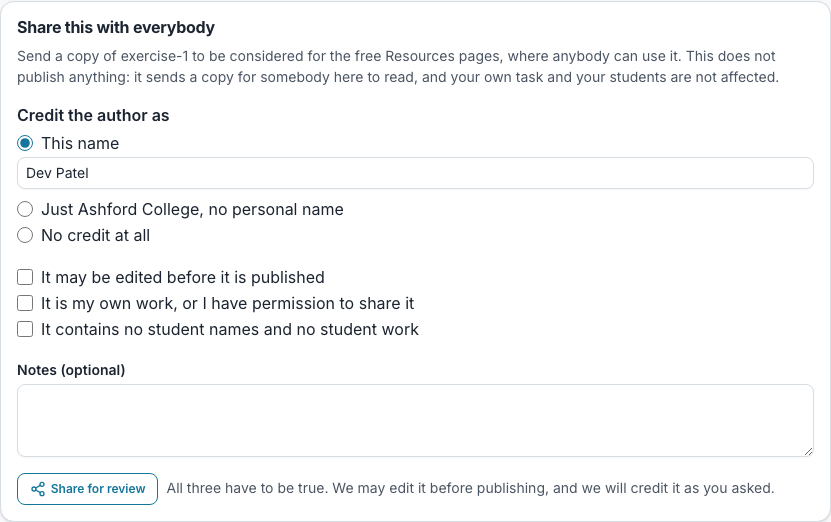
You declare three things when you offer it, and it is refused unless all three are ticked: that it may be edited before it is shared, that it is your own work or you have permission to share it, and that it contains no student names and no student work. The agreement is kept even after the copy that carried it has gone.
Tasks, lessons and files can all be offered. Each has a Share for review control (on a task’s People tab, and on the row of a lesson or a file), and each sends a copy to the Library’s “Shared for review” folder, which only we can open. The three declarations, the choice of how you are credited and the note are the same for all three, and your own task, lesson or file and your class are not affected. The same one cannot be sent twice: the form tells you it has already been offered.
You choose how you are credited: a name you type, just your college, or nothing at all. Nothing prints nothing, rather than “anonymous”. The credit is kept with the copy in the Library and in the admin log.
Where it goes: the Library
The review ends in the Library. When we have read your copy, we file it in the Library folder called “Shared by colleges”. Nothing is in front of other colleges until we offer it to them, which is a separate decision, so being filed there does not make it visible to anybody.
It is a copy and not a link. Your own module goes on being yours to edit, and a change you make later does not change the copy we hold. Offered again, an updated lesson is a new copy beside the old one.
Nothing you share is shown on our Resources pages or anywhere else on the open internet, and there is no switch that puts it there. If you want one task to be opened by people you choose, give it a link instead.
Questions people ask
- Do I lose control of a lesson I share?
- No. It is copied rather than linked, so your own module goes on being yours to edit.
- Is my name on it?
- As you ask when you offer it: a name, just your college, or nothing. It is kept with the copy in the Library and in the admin log.
- Will it appear on the Resources pages?
- No. Those pages are written and checked by us. A shared lesson is filed in the Library, where it can be offered to other colleges.
- I shared a lesson that used to be on the Resources pages. Where did it go?
- Lessons that were public have been moved into the Library by us, with their credit, and their old addresses now lead to the Resources page.
- Can I offer the same task, lesson or file twice?
- No. Each can be sent once, and the form says so if it already has been.