Assessments: locking a task down
For an assessment you can lock a task down. It asks the student for full screen, keeps a note of leaving it, and tells you afterwards.
What it does, and what it honestly cannot
It asks for full screen and records when the page loses focus, so what you get is a record rather than a guarantee. A browser cannot stop somebody reading a second device, and nothing that claims otherwise is telling you the truth.
What it is good for is the ordinary case: a room of students, a timed task, and a record of who left the page and for how long.
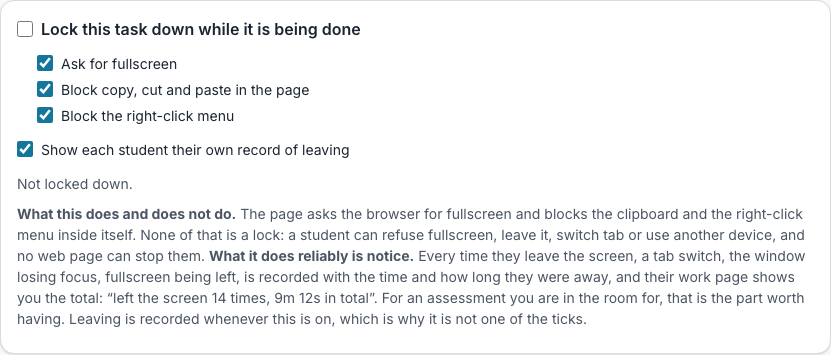
What you can switch on
One tick on the task’s settings turns the mode on, and three more sit under it for what the page does about it: ask for full screen, block copy, cut and paste, and block the right-click menu. All three are on to begin with, and you can turn any off for a room where pasting is legitimately needed. A fourth says whether each student reads their own record, which is on unless you turn it off.
Recording when they leave is not one of the ticks: it is the one part a browser cannot refuse, so it comes with the mode. Where full screen is asked for, the work is held shut until the student is in it, and shut again the moment they leave. The Escape key is never blocked, because it is how a browser leaves full screen and a student who could not press it would be shut in.
What you see when you mark
On the page you mark from: whether they left the page, how many times, and how long for. It sits beside the work rather than in a separate report, and reads like “Left the screen 14 times, 9m 12s in total”, with a line under it for each time, giving when it happened, what the page saw and how long they were away. On a task nobody locked there is nothing at all, rather than a panel of zeros that would look like a student who behaved perfectly.
Switching tab, switching app, the window losing focus and leaving full screen are all counted. One departure is one line however many things the browser noticed, anything under half a second is dropped because browsers report their own furniture, and anything over four hours is disbelieved rather than recorded as time away.
Each departure belongs to a sitting. If you send the work back and the student does it again, the new sitting starts a fresh record and does not carry the earlier one’s absences. And a closed tab ends the record rather than extending it: a departure is written when the student comes back, so somebody who leaves and never returns is described by the clock and their last save instead. That is the honest limit of a lock that lives in a web page.
What the student sees
The student is told in as many words, before they start, that leaving the screen is recorded. A banner counts this sitting’s departures as they happen, so nothing on the report is a surprise. Where you have left the fourth tick on, they can read the same summary and the same line-by-line list you do, on the task page and beside the editor.
It is a deterrent because they can read it, and it is the one place this record differs from the access log: yours is not a setting, theirs is.
Questions people ask
- Does it stop them opening another tab?
- No. It records that they did. A browser cannot prevent it, and a feature that said it could would be misleading you at the worst moment.
- Can I combine it with a time limit?
- Yes, and that is the usual pairing.