Getting a class onto a module in five minutes
Typing thirty email addresses into a form is the worst part of setting up any classroom tool. A join link is the way round it: you make one, the class follows it, and they are on the module.
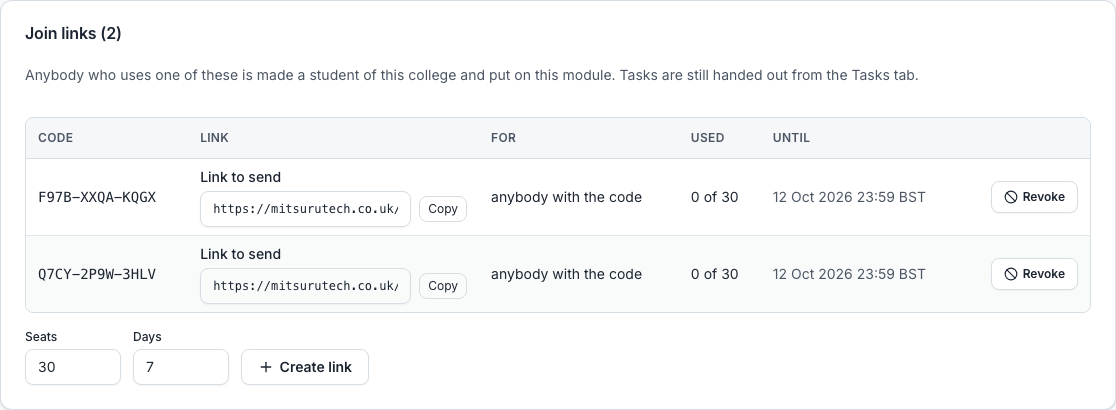
Create a link and set its limits
You choose how many places it is good for and when it expires. Both are real limits: the twenty-first person through a twenty-place link is turned away, and a link past its date does nothing.
You can restrict it to a list of addresses, so it works for your class and nobody else who ends up with the link.
A code is good for up to 200 places. A code anybody may use expires within a week at most, and one restricted to a list of addresses within 30 days. The places are spent one at a time as people join, so a class of 25 can never become 26. The panel shows the whole link beside a Copy button, which is what you send, and not only the code.
What the student does
Follows the link, gives their address, types the code we email, and they are in. If they already have an account they are added to the module immediately without any of that.
Somebody who already has an account is simply added, and a second go says they are already on it rather than taking another place. Somebody with no account gets one, as a student of your college.
What a code does, and what it never does
One code can cover several of your college’s modules at once. It sets no work: students land on the module and you hand tasks out from the Tasks tab as usual.
It never moves an account from one college to another. Somebody who already belongs to another college is told a site administrator has to move them, so their work and their record do not travel by accident. Somebody who only ever booked a call becomes a student and keeps their bookings.
A course has join codes of its own, made on the course’s People tab. They give the college and a place on that course, in no particular year, and put nobody on a module: it is what a course leader wants in September, when the class is known and the modules are not yet set up. You set each student’s year afterwards.
You can see who came in that way
Joining is recorded, per person, so a module’s membership says who was added by a teacher and who let themselves in with a link. Every join is also written to the admin log, against the module and the account.
Questions people ask
- What if the link gets shared outside the class?
- It is bounded twice: by the number of places and by the address list if you set one. A link with no places left admits nobody.
- Can I turn a link off?
- Yes, at any time, and anybody already on the module stays on it. Turning a code off stops it without forgetting who used it.
- Can one link put a class on more than one module?
- Yes, any of your college’s modules, in one code.
- Does a course link put students on the course’s modules?
- No. It puts them on the course and in your college. Add them to modules afterwards, or use a module’s own code.